
Use this guide to move from the first Today view to routines, calendar plans, notes, reflection and a deliberate data transfer. The labels below match the current English app.
The app ships several language packs, so labels on your device may differ from these English steps. Device share-sheet and permission wording also varies by operating system.
Start on Today
Home opens the Today dashboard with a week strip and sections for routines, events, notes and current progress. Pinned notes and checklists have a dashboard section; its position follows the dashboard layout and the number of pinned notes is not capped.
- Open Home and select a day in the week strip.
- Tap a routine row to record completion for that day.
- Use All notes to open the Notes hub, or open a pinned note from the dashboard.
Today is a daily overview. Use Reflection for longer-range history.
Plan in Calendar
The main Calendar switch offers Month and Week. Selecting a date opens Day detail with that day's plans and routines. Day is a drill-down, not a third primary calendar mode.
- Open Calendar, switch between Month and Week, then select a date.
- In Day detail, use the add action for New Event or New Note and save it to that day.
- To see existing device events, open Settings → Calendar, turn on Show device calendar events and grant permission. Calendar may also offer Connect.
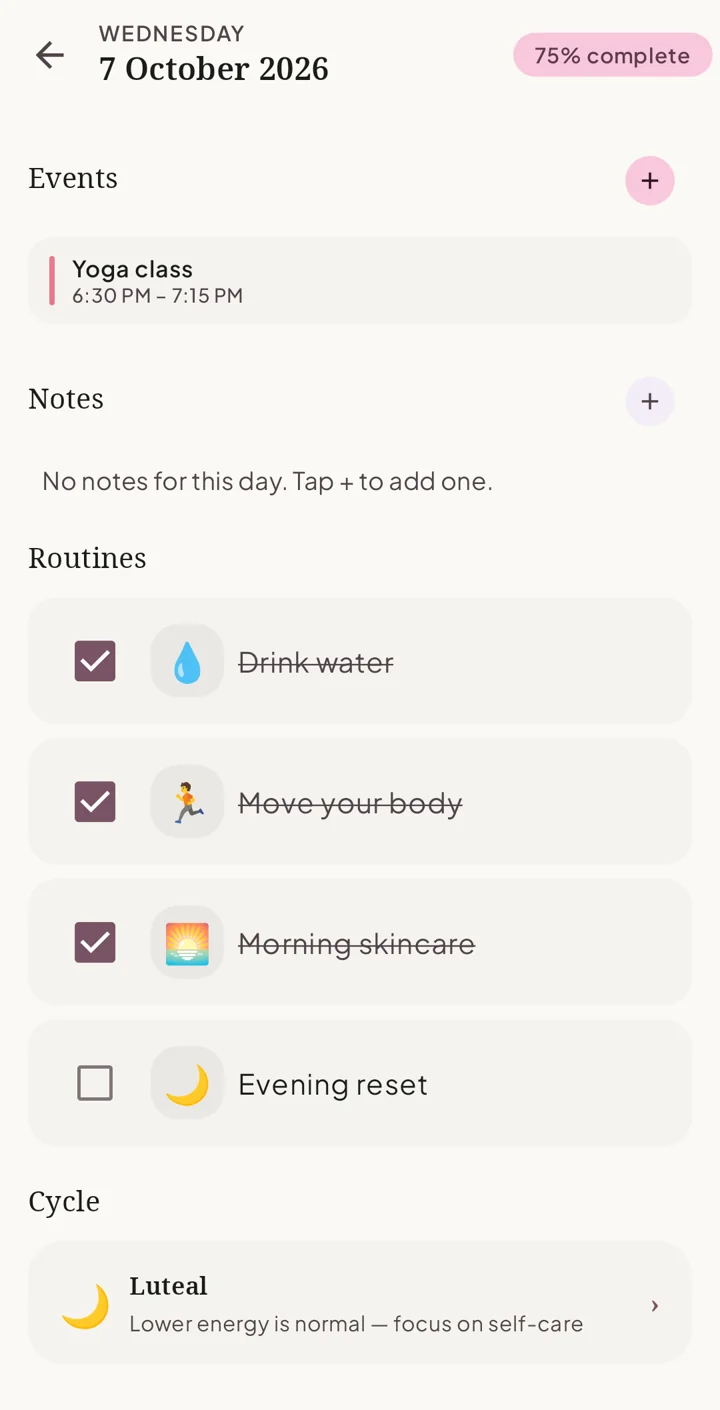
On Android, Siela reads events already in the device calendar provider after permission; any account's own device sync is separate. On iPhone, EventKit access depends on the iOS version and permission choice. Sync events to calendar can prompt a separate native review and save action for a Siela event. These controls do not directly connect Siela to a Google or Apple cloud account.
Create a routine that fits the task
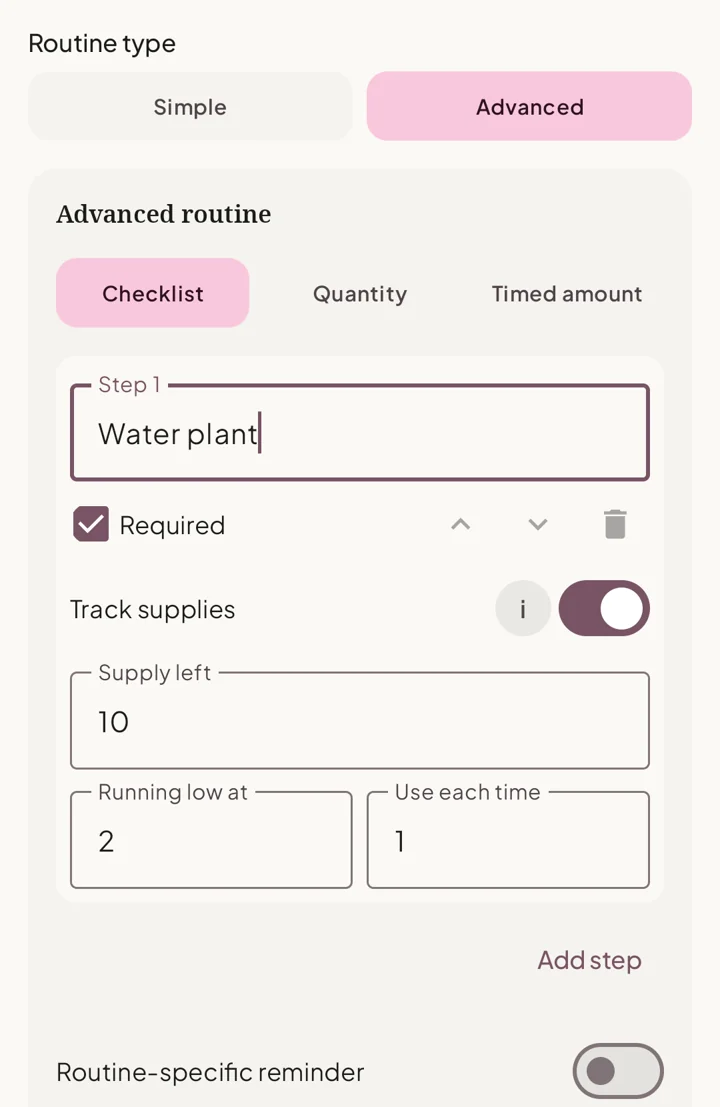
A Simple routine is a checkbox. Schedule it every day or on selected weekdays. An Advanced routine offers Checklist, Quantity and Timed amount modes. Checklist steps can be required or optional; Quantity tracks progress toward a target and unit; Timed amount records time-specific steps, amounts and units.
- From Home, open the Routines section's management action, or go to Settings → Routines → Manage Routines.
- Add a routine, name it, choose an every-day or weekday schedule, and select Routine type: Simple or Advanced.
- For Advanced, choose Checklist, Quantity or Timed amount. Enter the appropriate steps, target or times and amounts. Configure a reminder or optional supply count if useful, then save.
- Return to Today or Day detail to record progress; edit the routine later in Manage Routines. On the Manage Routines list, long-press and drag to reorder; turn Active off to hide a routine from future Home days while retaining its history.
An existing Advanced routine cannot be changed back to Simple. Custom premium schedules are outside the currently available everyday and weekday instructions.
Set up a pill or vitamin routine
Timed amount can help organize a personal pill, vitamin or supplement routine. Siela records the plan and its completion; it does not choose a dose or verify a prescription.
- In Manage Routines, add a routine and choose Advanced → Timed amount.
- Name each step and enter its time, amount and unit from your own plan. Set a step reminder if wanted.
- Optionally enable supply tracking, then set the remaining amount, a low threshold and the amount used per completion.
- Save and mark a step complete on Today or Day detail. Review remaining supply and record refills or corrections yourself.
Write, pin and share notes or checklists
The Notes hub groups pinned and dated entries. A new item can be a Note or Checklist, for For today or Pinned placement. To attach a note to another date, open that date in Calendar Day detail and choose New Note. Its title is optional. Checklist rows retain individual check states; pinned items remain visible on the dashboard until unpinned or deleted.
- From Home tap All notes, then add an item. Choose For today or Pinned, followed by Note or Checklist.
- Enter an optional title and text or checklist rows. Tick rows as you finish them; the list shows a completed count.
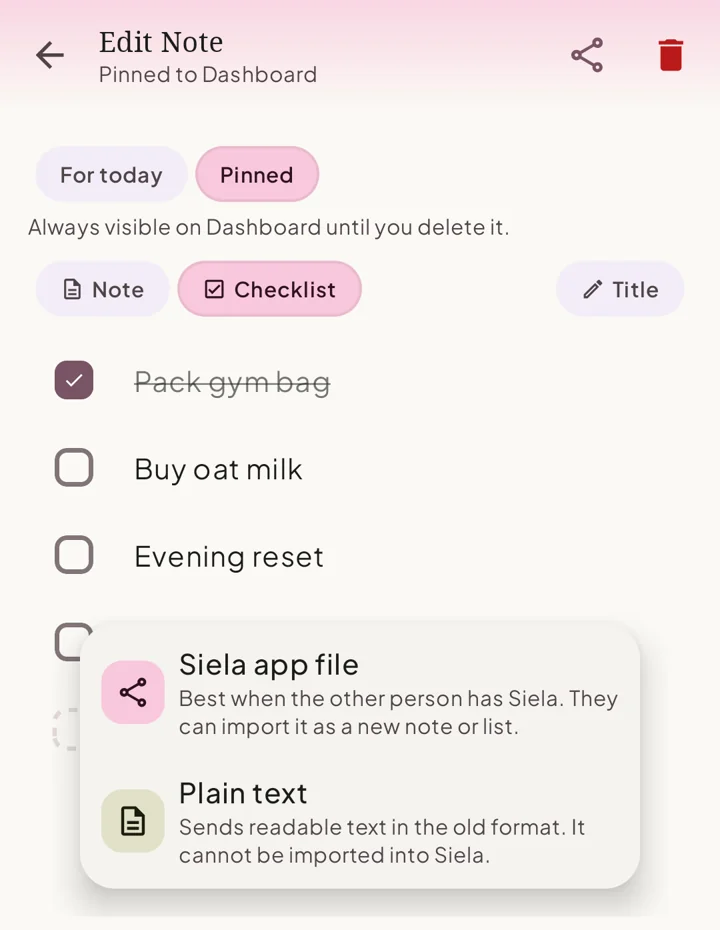
- Open the note and use Share, or use the share action on its card in the Notes hub.
- Choose Plain text for a readable copy or Siela app file for an importable
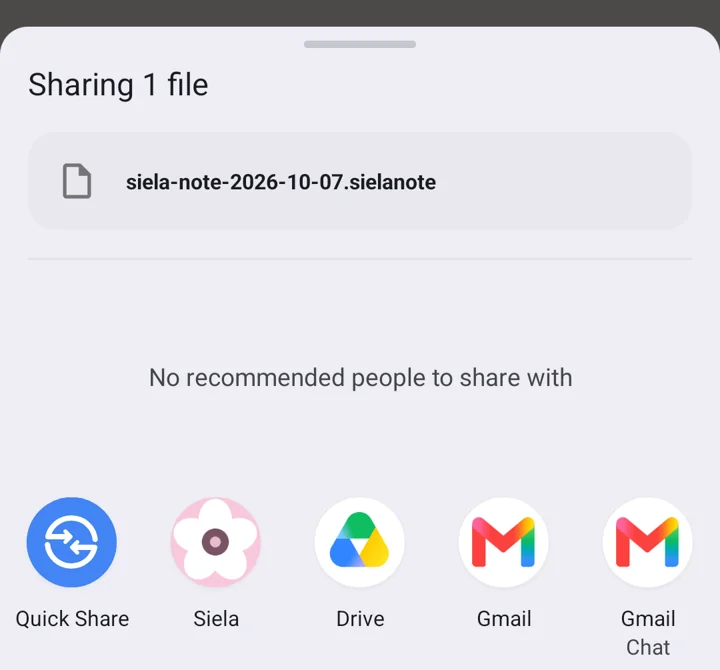
.sielanotecopy. Select a destination in the device share sheet.
How to share a Siela note with another device
A Siela app file carries one note or checklist, including its title, text or ordered checklist rows and check states, date or pinned placement. The .sielanote file contains readable JSON and has no app-added encryption, so choose a trusted destination for its contents. The original stays on the sending device. The receiving device creates a separate new item; later edits on either device do not update the other.
- On the sending device, open the note or checklist, tap Share and choose Siela app file, not Plain text.
- Send the
.sielanoteattachment unchanged through a share destination that preserves the file. Share-sheet choices vary by operating system and destination app. - Install Siela on the receiving Android phone or iPhone. Open the file with Siela, or share the received file to Siela using the options the operating system presents.
- Look for Note imported, then find the new note or checklist in Siela. File-opening choices depend on the operating system and the app holding the attachment. If Siela is not offered, save the file first and try Open with or Share.
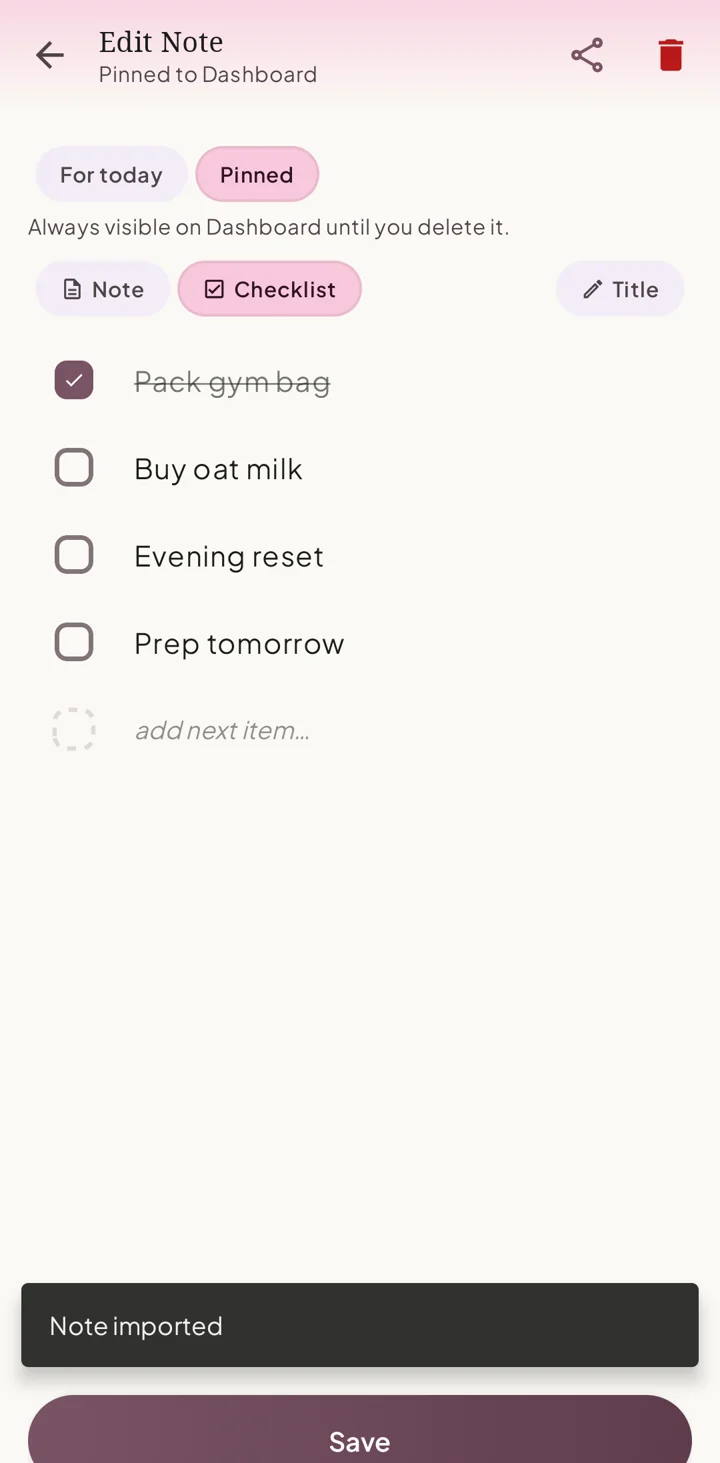
The receiver rejects invalid files, unsupported versions and files of the wrong type. Plain text is readable but cannot be imported as a Siela note. A full JSON backup belongs in Settings → Data → Import Data, not this single-note flow. There is no cloud or live-collaboration fallback.
Look back in Reflection
Reflection has Overview, Routines and Milestones. Select 7 days, 30 days, 12 weeks or Year. Overview shows history with day or aggregate details. Routine trends reflect scheduled opportunities and completed or partial effort. Milestones show achieved and pending care moments without demanding a streak.
- Open the Reflection tab and choose a range.
- In Overview, tap a day or aggregate for detail. In Routines, tap a routine for history in that range.
- In Milestones, review achieved moments or actions for moments not reached yet.
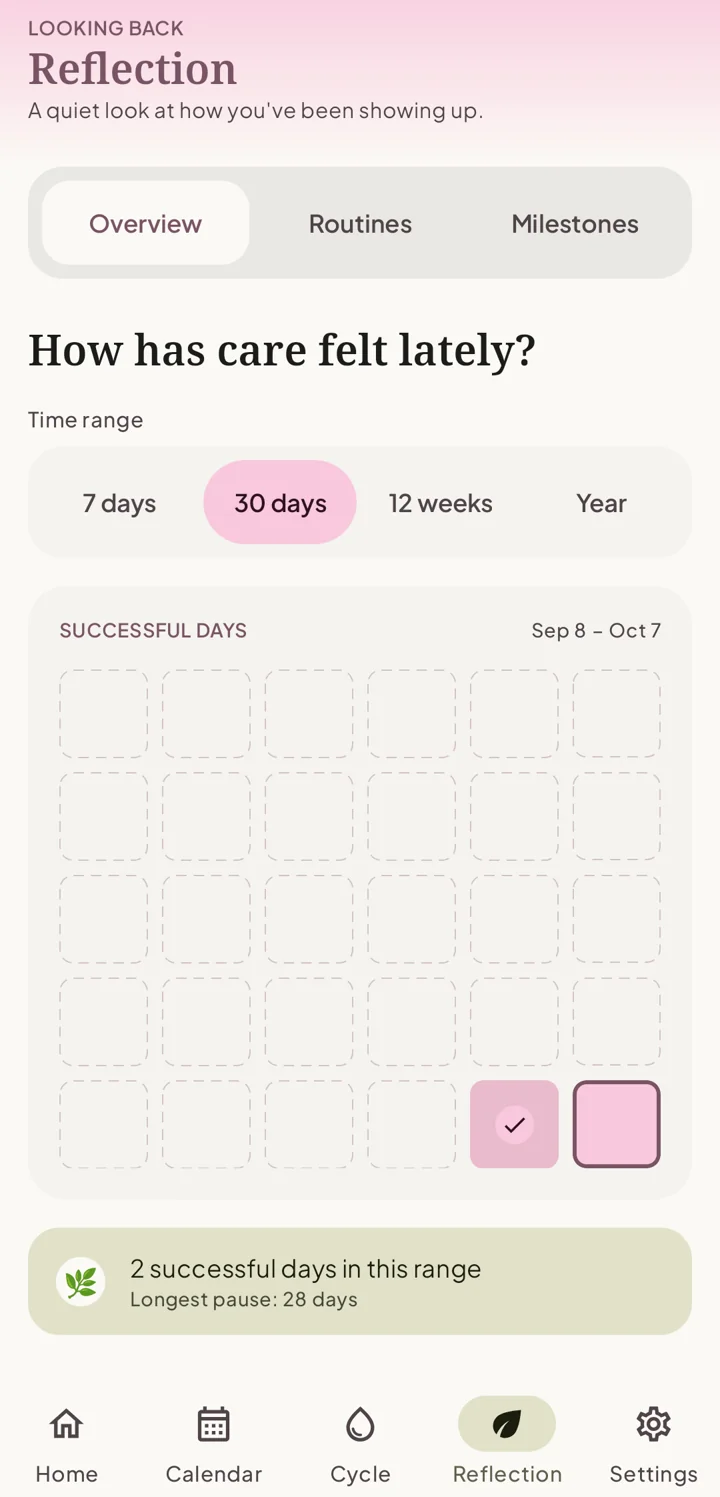
If a range has no entries, try a wider range. A routine trend can also need more scheduled opportunities before a useful pattern appears.
Use cycle tracking only if it serves you
Cycle tracking is optional. When enabled, you can log or edit period dates and flow, log symptoms, and review recorded history and estimates. Estimates depend on logged data and remain uncertain, especially with little or irregular history.
- In Settings → Cycle, turn on Enable Cycle Tracking if you want cycle surfaces.
- Open the Cycle tab to log a period or symptoms and review entries. Edit a period if its dates or flow need correction.
- Turn Enable Cycle Tracking off to hide cycle surfaces and reminders. Existing records remain stored and return when you enable it again.
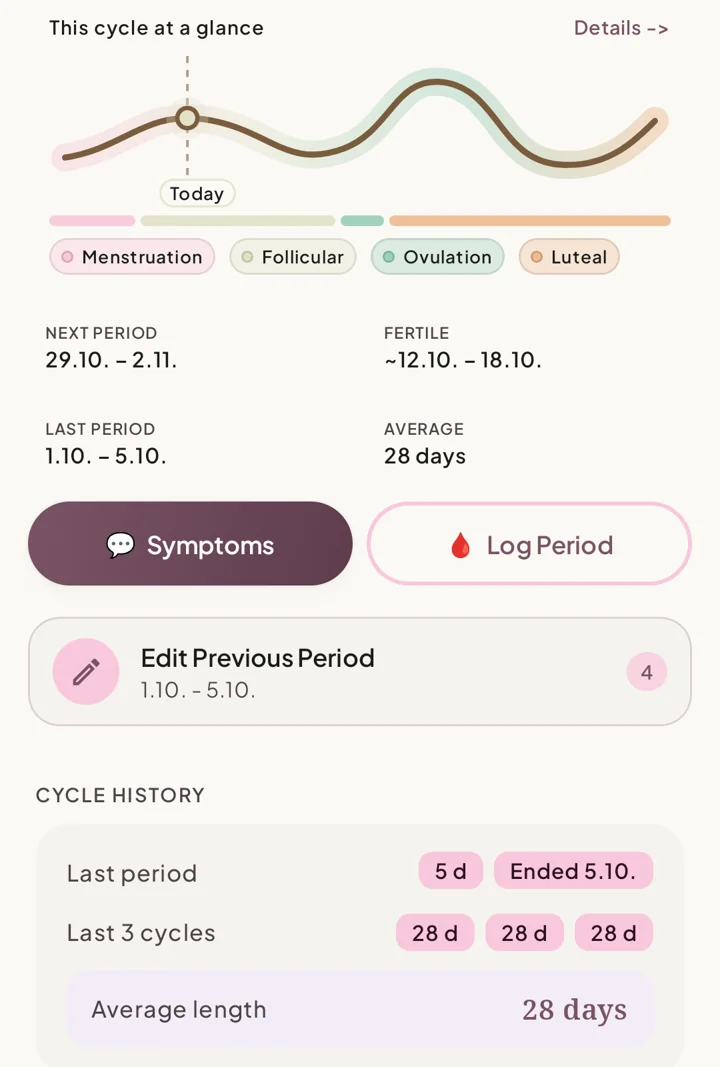
Read the cycle-aware planning guide for use without phase-based rules. Siela does not provide diagnosis, treatment, contraception or fertility guidance.
Adjust appearance and reminders
Settings → Appearance offers Light, Dark and System default themes, plus Soft Pink, Lavender, Sage Green and Warm Beige accent colors.
- Choose a Theme or Accent color in Settings → Appearance.
- In Settings → Notifications, review All notifications, Morning summary, Routine reminder, Event reminders and Motivational prompt. Cycle reminder appears only with cycle tracking enabled.
- Choose the available times and event lead time or all-day behavior, then allow device notification permission when prompted.
The operating system can block or delay delivery through permissions, battery or alarm settings. Premium appearance choices are outside the basic controls described here.
Keep control of copies and transfers
Siela keeps personal app data on the device in the current version. There is no account, developer-run cloud profile or automatic cross-device sync. Siela sends a copy to your chosen destination when you use its export or share controls; after that, the destination and your device services control their own storage and delivery. The public site's aggregate analytics are separate from mobile app content; see the Privacy Policy.
- On the source device open Settings → Data → Export Data. Choose Save to device or Share and keep the JSON file somewhere you control.
- On the receiving device, first export any Siela data you want to keep. Then open Settings → Data → Import Data and choose the full JSON backup in the device file picker.
- Review the replacement warning. A valid import replaces the receiving device's current Siela data. Invalid or unsupported files do not become a partial restore.
To erase this device’s Siela records, use Settings → Data → Delete All Data and read both confirmation prompts. Deletion permanently removes Siela data on this device, so export anything you want to keep first. Copies you previously exported or shared remain wherever you sent or saved them.
A .sielanote file adds one note or checklist. The full export includes routines, events, notes, settings and other saved app information, including cycle records when you have logged them. It is a readable JSON file without an app-added password or encryption, so choose a trusted destination and protect the copy.
Capabilities and limits at a glance
Frequently asked questions
What can Siela do?
Siela combines a Today dashboard, calendar, simple and advanced routines, reminders, notes and checklists, Reflection, and optional cycle tracking in one private mobile planner.
Do I need an account?
No. Siela has no required account. Personal app data stays on your device unless you deliberately export or share a copy.
Does Siela upload or automatically sync my app data?
No. There is no automatic cloud or cross-device sync. The public website has separate aggregate analytics described in the Privacy Policy.
Can I use Siela for a pill or vitamin routine?
Yes. A Timed amount routine can record steps with time, amount and unit, reminders and optional supply tracking. Siela gives no dosing or medical advice.
Can advanced routines have steps, quantities and supplies?
Yes. Advanced routines offer Checklist, Quantity and Timed amount modes. Optional supply tracking can show a running-low threshold and reduce a count as you record completion.
How do reminders work?
Set a routine or step reminder in its editor and review Settings → Notifications. Delivery depends on device notification permission and operating-system settings.
Can Siela show Google or Apple Calendar events?
With calendar permission, Siela can show events already available through your device calendar. Provider setup and device sync happen outside Siela.
Does a Siela event automatically save to my device calendar?
No. The optional setting can prompt a separate native review and save action. The result depends on device, provider and permissions.
Can I share a shopping list or note?
Yes. Share Plain text for a readable copy, or Siela app file for a .sielanote copy another Siela user can import as a new note or checklist. Later edits are not shared live.
Can I import plain text or a full backup as one note?
No. The single-note receiver accepts a valid .sielanote file. Plain text cannot be imported, and full JSON backups belong in Settings → Data → Import Data.
How do I move everything to a new phone?
Use Settings → Data → Export Data on the old phone, then Import Data on the new phone. Export the new phone's current data first because full import replaces it.
What if Reflection has little history?
An empty range can show no history; routine trends may need more scheduled opportunities. Try a wider time range or record more days.
Is cycle tracking required?
No. Enable Cycle Tracking is optional. Turning it off hides cycle surfaces and reminders while preserving existing records.
Can cycle estimates guide medical or fertility decisions?
No. Estimates depend on logged history and remain uncertain. Siela does not provide diagnosis, treatment, contraception or fertility guidance.
Can I change the app's look?
Settings → Appearance offers Light, Dark or System default themes and Soft Pink, Lavender, Sage Green or Warm Beige accent colors.
Keep your day together, without giving up control of your data.
Download Siela to plan routines, calendar events, notes and lists in one private place. Add optional cycle context when it is helpful, and use reminders and supply tracking for the practical routines that support your day.